
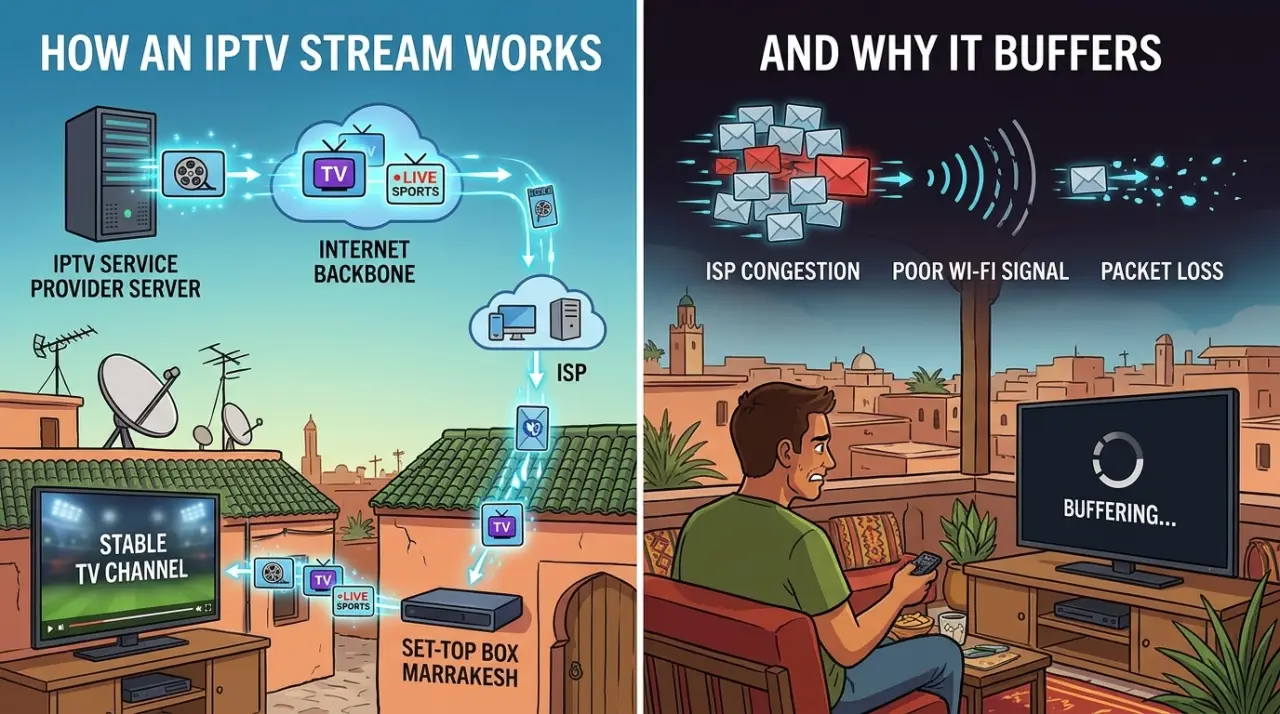
An IPTV stream is video data sent to your player app in small, continuous chunks over an internet connection, rather than tuned in from a dedicated broadcast signal the way cable or satellite works. Understanding what's actually happening at that technical level — not just "it's IPTV" — makes it much easier to diagnose why a stream buffers, freezes, or looks worse than expected on one device but not another.
What's Actually Happening When You Watch a Stream
When you open a channel in an IPTV player app, the app requests the stream from a server using a URL tied to your subscription credentials. That server sends the video as a continuous sequence of small segments rather than one large file, so playback can start within a few seconds rather than waiting for a full download. Each segment plays as soon as it fully arrives, and the next one is already being fetched in the background — this is the same general approach used by most video streaming, not something unique to IPTV.
Because the stream depends on this continuous segment-by-segment delivery, both ends of the connection matter: the server's own capacity and your internet connection's stability. A problem on either side shows up the same way to you — as buffering — which is part of why diagnosing the actual cause takes a bit more than just restarting the app.
The Formats Behind the Stream: M3U and Xtream Codes
Two delivery methods come up constantly once you're actually troubleshooting or setting up a stream:
- M3U playlist. A plain-text file listing stream addresses and basic channel metadata. Your player app reads this file to know which URL to request for each channel.
- Xtream Codes API. A login-based method (server address, username, password) that typically also delivers EPG data and an organized on-demand catalog, rather than a static playlist file.
Neither format changes the fundamental streaming mechanics described above — they're just different ways of telling your player app where to actually request the stream from.
Why a Stream Actually Buffers or Drops
Buffering gets blamed on "slow internet" by default, but that's only one of several real causes:
- Server-side congestion. If too many subscribers are pulling from the same server at once — common during peak evening hours or major live sports events — the server itself becomes the bottleneck, regardless of how fast your own connection is.
- Your network, not just your plan speed. Wi-Fi interference, other devices competing for bandwidth, and router distance all affect stream stability independently of your internet plan's advertised speed.
- Player app performance. Some player apps handle segment buffering and error recovery better than others on the same stream and connection — part of why switching player apps sometimes fixes a problem that looked like a connection issue.
- The stream source itself. A provider streaming at a bitrate higher than the underlying source material supports, or running on under-provisioned infrastructure, will buffer regardless of what's happening on your end.
Isolating which one is actually responsible is more useful than assuming the first explanation — testing on a different network, at a different time of day, and on a different device each rules something out. Our breakdown of what affects IPTV picture quality and reliability goes through this diagnostic process in more depth.
The Player App's Role
The player app is what turns the raw stream into something watchable — handling playlist or Xtream Codes login, buffering segments ahead of playback, and usually providing the EPG and channel-browsing interface. Popular options include IPTV Smarters Pro, TiviMate, and VLC-based players, among others, and they genuinely differ in interface, buffering behavior, and platform support rather than being interchangeable.
If you're specifically looking at Kodi as a player rather than a dedicated IPTV app, our guide to Kodi addons for IPTV covers what that setup involves differently. For Windows or Mac specifically, choosing an IPTV player for desktop covers the considerations unique to those platforms.
Once you understand how the stream itself works, the next practical question is usually which actual IPTV streaming service to subscribe to — our guide to comparing providers covers the criteria that matter beyond advertised channel count. And if you're still unclear on what IPTV means as a category before going further, our plain-language explanation of IPTV is the place to start.
GetTV.online streams 40,000+ live channels and 150,000+ movies and series through standard player apps, with setup guides for common devices and a free trial to test stream quality on your own connection before subscribing.
FAQ
Why does my IPTV stream buffer even with fast internet?
Fast internet doesn't rule out server-side congestion, Wi-Fi interference, or player app performance — all of which can cause buffering independently of your connection speed. Testing on a different network or device helps isolate the actual cause.
What's the difference between M3U and Xtream Codes?
M3U is a plain-text playlist file listing stream addresses. Xtream Codes is a login-based method that typically also delivers EPG data and an organized on-demand catalog. Both ultimately point your player app to the same kind of underlying stream.
Does the player app actually affect stream quality?
Yes — different apps handle buffering and error recovery differently on the same stream and connection, which is why switching player apps sometimes resolves a problem that looked like a connection issue.
Why does a stream work fine on one device but not another?
Device-specific factors like available processing power, the specific player app installed, and that device's network connection (Wi-Fi vs. wired, signal strength) can all affect playback independently of the stream itself.
Is a wired connection better than Wi-Fi for IPTV streaming?
Generally yes for consistency, since a wired connection avoids Wi-Fi interference and signal-strength variability, though a strong, uncongested Wi-Fi connection can work fine too.