
Streaming TV simply means watching television content that's delivered to your device over the internet, instead of through a cable line, satellite dish, or broadcast antenna. That's the whole core idea — everything else people associate with streaming (apps, subscriptions, on-demand libraries) is really just a consequence of that one basic shift in how the picture gets to your screen.
The Simple Definition
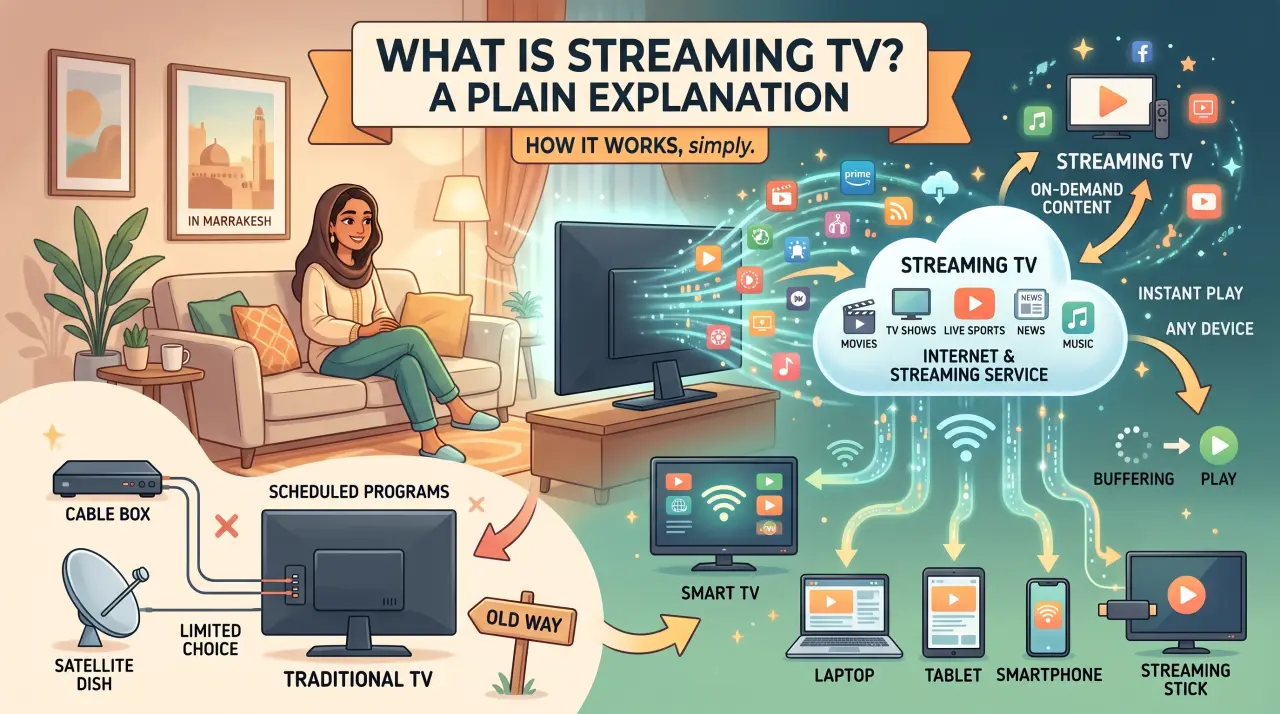
Streaming TV is television content sent to your device as data over an internet connection, rather than through dedicated broadcast infrastructure. Instead of a cable box decoding a signal from a coaxial line, a streaming app on your TV, phone, or streaming device receives and plays video the same general way a webpage loads — just continuously, for video instead of text and images.
How Streaming TV Actually Works
When you open a streaming app and hit play, your device requests the video from a server over the internet, and that server sends it back in small pieces that play nearly as soon as they arrive — this is why you don't have to wait for an entire show to download before watching. Your internet connection's speed and stability directly affect playback quality, which is a real difference from cable: a weak Wi-Fi signal can cause buffering in a way that traditional cable reception generally didn't.
Streaming TV vs. Cable and Satellite
Cable and satellite both depend on infrastructure built specifically for television — a physical line run to your home, or a dish with a clear view of the sky. Streaming TV skips that infrastructure and uses the same general-purpose internet connection you already have for everything else. That's the practical difference underneath most of the other distinctions people associate with streaming: no technician visit required for setup, no dedicated cable box in most cases, and the ability to watch on whatever device you already own rather than one tied to a specific line into your house.
The Two Basic Categories
Once you understand the delivery method, streaming TV splits into two genuinely different experiences:
- On-demand — a library of shows and movies you browse and start whenever you want, the model most people picture first when they hear "streaming."
- Live streaming TV — a continuous channel feed, the same way flipping to a channel on cable worked, just delivered over the internet instead of a cable line.
Many apps focus on just one of these categories; others combine both. Our breakdown of streaming apps covers that distinction in more depth, and our guide to over-the-top (OTT) streaming covers the industry terminology behind why this delivery method is often called "OTT."
What You Need to Get Started
- A stable internet connection — wired or strong Wi-Fi, since streaming quality depends directly on it
- A compatible device: a Smart TV, streaming stick, phone, tablet, or computer
- At least one streaming subscription or service, matched to whether you want on-demand content, live channels, or both
For live channels specifically, a broader subscription like GetTV.online bundles 40,000+ live channels and 150,000+ movies and series into one app, with setup guides for common devices.
FAQ
What does "streaming TV" actually mean?
Watching television content delivered over an internet connection instead of cable, satellite, or broadcast infrastructure. It's a delivery method, not a specific app or service.
Do I need cable to use streaming TV?
No. Streaming TV works over your existing internet connection, independent of any cable or satellite subscription.
Is streaming TV the same as Netflix?
Netflix is one specific example of a streaming app, focused on an on-demand library. "Streaming TV" is the broader category that includes both on-demand apps and live-channel apps.
Why does my streaming TV buffer sometimes?
Playback quality depends directly on your internet connection's speed and stability. A slow or unstable connection is the most common cause of buffering, unlike traditional cable reception.
How do I start with streaming TV?
Confirm a stable internet connection, pick a compatible device, and choose a service matched to what you want to watch. GetTV.online's free trial is one way to test a live-channel streaming setup before committing to a plan.